OSM to TIFF Tiles
This builds upon my previous post OSM to Raster Tiles with the goal of creating a Tagged Image File Format (TIFF) from the Portable Network Graphics (PNG) tiles generated from the Open Street Map data.
Creating the TIFF
For this project, I relied heavily on Geospatial Data Abstraction Library (GDAL) to handle the heavy lifting.
The process I used was:
- Create TIFF from the PNG with coordinate system information.
- Merge the individual TIFFs together into a single TIFF.
The first stage was converting the PNG to TIFF with the corresponding
coordinate system information attached. For this I wrote script that created
a command script with following:
gdal_translate -a_srs EPSG:4326 -a_ullr 138.53759765625 -34.908457853981375 138.54034423828125 -34.91071020549453 G:\GeoData\Generated\tiles_adelaide\17\115976\79114.png G:\GeoData\Generated\tiles_adelaide_tiff\17\115976\79114.tif
Since the tile are stored under the slippy map tile names scheme it quite easy to go from the tile index to WGS84 coordinates.
When I first did this a few years ago, I needed -expand rgb otherwise it came
out grey-scale. This weekend when I tried including that option today, it
ended up with the error and working without it:
“ERROR 1: Error : band 1 has no color table”.
For testing this I looked for a zoom level which had at least two tiles in each direction which for my area of interest was zoom level 12.
Special thanks to a post by Jimmy Utterström, which essentially covers the a similar idea as this post. The post helped me with computing the WGS84 coordinates from the tiles and the snippets were already in Python. When redoing this work I ended up using algorithm in the past post from the OpenStreetMap wiki.
An alternative to this step would have been to write out a world file (PGW) with the coordinate system information.
Merging the TIFFs together
- First option using
gdal_merge.pygdal_merge.py -o adelaide_15.tif <all the separate tiffs created above> - Second option using
gdalbuildvrtand thengdal_translategdalbuildvrt mosaic.vrt <all the separate tiffs created above> gdal_translate mosaic.vrt adelaide_15.tif
A spoiler for later but gdal_merge.py and the gdal_translate options should
have: -co TILED=YES -co COMPRESS=DEFLATE in order to ensure a reasonble
file size.
Script
The script I used to create the commands that I then ran in a Anaconda environment which had GDAL installed, is available in a gist.
This script uses the first option above where it runs gdal_merge.py but handles if there are a lot of files it passes the paths to the file to the script via a file containing the paths.
If I was to do this again, I might instead see about using a Virtual Dataset.
This is defined by a file with the extension vrt that, can references each of
the original PNGs and I believe it can even handle having the coordinate system
information within them.
However, since this post has been almost at least 2 years, I decided it was time to revisit this aspect. The verdict was it was not looking promising. The VRT file would likely require computing the pixel offsets of each file and essentially doing most the tiling. It is not as simple as provding the list of PNGs and their geo-referenced coordinates and leave the gdal_translate stage to figure out we want to tile them or create a mosaic.
At that point, I think I would prefer writing a native tool that read the PNGs and created the GeoTIFF and thus eliminates GDAL and the need to script the set-up of it.
Trouble shooting TIFF
My initial attempt at constructing a TIFF from the tiles can be seen below, where there are two problems, but the most obvious one that I wanted to fix first was the tile ordering.
The other problem that is not as obvious from the image is the source data was in fact in colour and not greyscale.
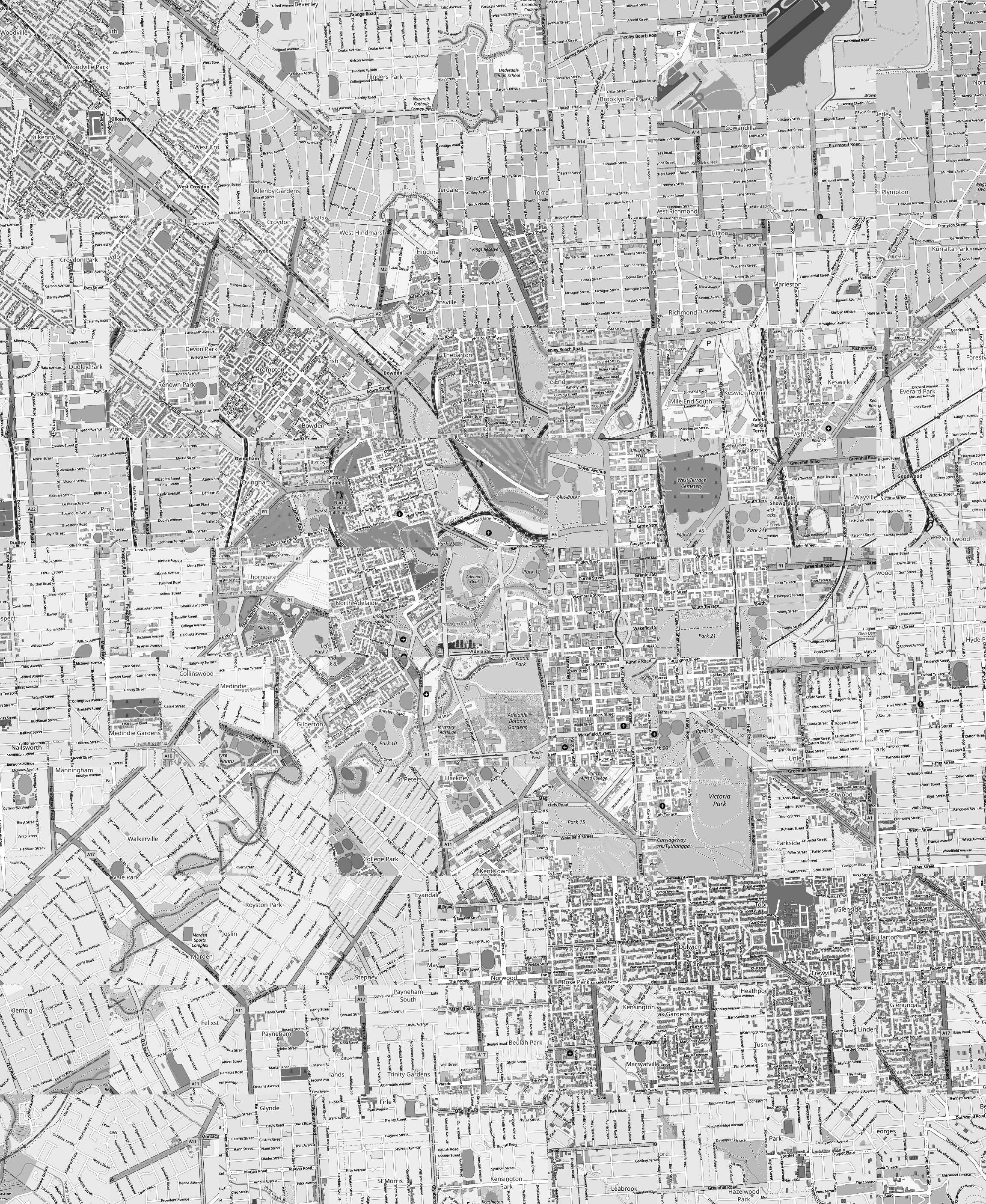
Unfortunately, the original code that was used here was lost so can’t include an extract of what the problematic part was and the solution.
After fixing up the tile referencing that fixed that problem, however it was still in greyscale.
The next thing to tackle was the colouring bug. I believe the problem was when converting the individual tiles PNG to TIFF the fact it was in colour as lost.
The fix for that was to add -expand rgb however as mentioned above when I
did this again in 2023, I didn’t run into that problem.
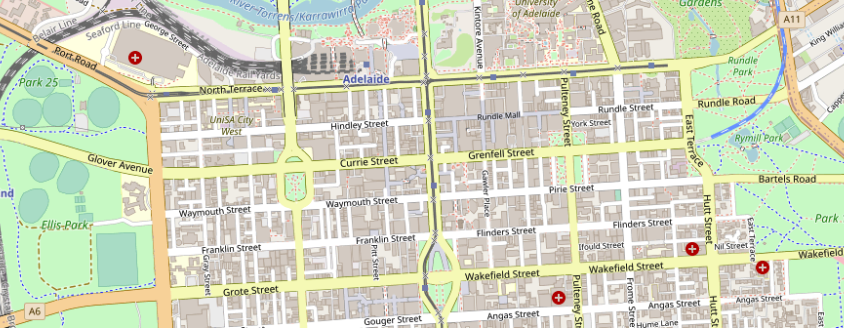
The resulting TIFF at zoom level 15 of just the city centre and neighbouring suburbs was 20 megabytes. The idea was add the other zoom levels to the TIFF but I never got around to doing that.
The resulting TIFF at zoom level 17 was 250 megabytes but in 2023 it was 327MB. The sizes are essentially the same as the sum of the individual TIFFs.
However, the source PNGs are only 16MB. This seems related to compression method, the documentation says compress as JPEG and use PHOTOMETRIC=YCBCR however in my 2023 attempt the PNGs have alpha channel so the resulting TIFF has 4 bands instead of 3.
The gdal_merge script doesn’t support dropping the alpha band, so instead building a VRT and then drop the bands when making the translation from VRT to TIFF did the trick:
gdal_translate -b 1 -b 2 -b 3 -co COMPRESS=JPEG -co TILED=Yes -co PHOTOMETRIC=YCBCR mosaic.vrt G:\GeoData\Generated\tiles_adelaide_tiff\adelaide_17.tif
The downside is while the resulting TIFF is 12MB, it clearly looks like a JPEG as there are JPEG artifacts around labels.
Instead opting for COMPRESS=DEFLATE gave decent results at 35MB, keeping
the alpha band and its about 60MB.
At this point I’m happy with the result.
Future
- Replace GDAL pipeline with libpng + libtiff + own code to do the tiling or libgeotiff to geo-reference the final image.
- Create Python script that generates the VRT file that uses the PNGs to skip the intermediate TIFFs. Overall, I think I would rather focus on the previous idea.
- Explore if overviews in the TIFF can be created from source PNGs of different zoom levels.