OSM to TIFF - History
Rendering OSM data to Portable Network Graphics (PNG) then constructing a Tagged Image File Format (TIFF) from the PNGs.
Map data from OpenStreetMap for all maps shown in images unless otherwise stated.
This project was mostly done 2020-09-12 and various notes were collected from that time but I wanted to re-create it to try to fill in some missing steps and inaccuracies. To make matters worse, in late 2021, the hard drive which held the data and attempt was lost due to a drive failure. In late 2021, I also lost a hard drive which held the data and attempt.
I have now finally reproduced the rendering OSM data to PNG results and have decided to provided this in three parts. This being the first part covers the historical journey with some of the steps missing as well as an attempt to reproduce it. The second will be the fresh attempt and the third will cover the TIFF section.
Creating PNGs
For generating the tiles, you might have better luck, following the Switch2OSM’s article “Manually building a tile server”.
Windows Setup
This is the set-up needed for osm2pgsql. I used Postgres 12 but I am sure 14 would work.
- Create the database storage
.\initdb.exe --username=postgres --auth=trust --encoding=utf-8 -D G:\GeoData\Generated\postgres_data - Start the server
.\pg_ctl -D G:\GeoData\Generated\postgres_data -l G:\GeoData\Generated\postgres_data\logfile start - Create the database called ‘gis’ which is where the data will be imported
into as well as load the PostGIS extensions for the database.
Without this you get:
Connection to database failed: FATAL: database "gis" does not exist..\createdb -U postgres gis .\psql --username postgres -d gis -c 'CREATE EXTENSION postgis; CREATE EXTENSION hstore;' - Import the data
.\osm2pgsql.exe -c -d gis --slim -k G:\GeoData\Source\australia-oceania-latest.osm.pbfThis took about 30 minutes.
- Clone the OpenStreetMap Carto repository.
git clone https://github.com/gravitystorm/openstreetmap-carto.git - Apply the rendering / carto scripts. I believe tweaks the database for the
purpose of making the rendering easier.
.\osm2pgsql.exe --slim -d gis -C 3600 --hstore -S openstreetmap-carto/openstreetmap-carto.style --tag-transform-script openstreetmap-carto/openstreetmap-carto.lua G:\GeoData\Source\australia-oceania-latest.osm.pbf --user postgres - Inside the repository, run the script
cd openstreetmap-carto
scripts/get-external-data.py --username postgres
scripts/get-fonts.sh
Back in 2020, a number of hoops were jumped through to install all the relevant fonts via Ubuntu’s package manager (apt) however when revisiting it for writing this article, it was noticed the get-fonts.sh script handles fetching them all for us. The script however was introduction in 2022-08-03. The command that I used at the time was:
apt install fonts-arundina fonts-sil-padauk fonts-khmeros fonts-gargi fonts-tibetan-machine fonts-droid-fallback fonts-open-sans
Databases
At this point the database were ready and we need to move onto the styling.
Map Styling
CartoCSS is a system for defining style-sheet for maps and the carto tool can convert from the MML format to Mapnik XML.
For this article I used the OSM Carto style.
It is at this point where the the project.mml can be modified to provide the database parameters, so for the Linux instructions above port 15000 and/or if you running it on another machine the host or as a different user.
OSM Carto
The CartoCSS format stylesheets for OpenStreetMap style is found in the openstreetmap-carto repository by gravitystorm. It is unclear why ownership was not transferred to the openstreetmap organisation as such they don’t look as offical as the old Mapnik styles.
- Install carto through npm.
- Clone the Git repository for the OSM CartoCSS style.
git clone https://github.com/gravitystorm/openstreetmap-carto.git - Check out version tag, when writing this up it was
v5.6.1. - Run Carto to convert from the MML format to Mapnik XML.
carto project.mml --file osm-mapnik.xml
What is not included here is:
- Downloading shapefiles with scripts/get-external-data.py
- Downloading fonts with scripts/get-fonts.sh.
OSM Bright
- Install carto through npm.
- Clone the Git repository for the OSM Bright style.
- Follow the setup instructions in the README.md
- Download shapefile
- Rename/copy configure.py.sample to configure.py
- Tweak the variables to match the setting. The importer should be
osm2pgsql (which is the default at time of writing this).
- Run make
- Run Carto to convert from the MML format to Mapnik XML.
I don’t think I bothered with shapeindex as its a one-off task and I wasn’t going to reuse the shapefiles.
npm -g carto
git clone https://github.com/mapbox/osm-bright.git
# <follow the instructions in the README.txt>
carto $env:HOME\MapBoxProject\OSMBright\project.mml > osm_bright.xml
Mapnik
On Ubuntu 22.04
apt install mapnik-utils python3-mapnik libmapnik-dev- Fetch then generate_tiles.py script from the old (it was superseded back in
2013) stylesheet repository. However, it provides a reasonable reference
implementation for generating tile.
curl -O https://raw.githubusercontent.com/openstreetmap/mapnik-stylesheets/master/generate_tiles.py - Tweak
generate_tiles.pyto work with Python 3.- Convert print statement to print functions.
- Change
Queuemodule toqueue. In my case, I went for the try/except on the ImportError to handle both Python 2 and 3.
- Tweak
generate_tiles.pyto generate the area of interest. This means commenting out the other files and adding the snippet for the relevant region which in my case is as follows:bbox = (138.54, -34.95, 138.65, -34.88) render_tiles(bbox, mapfile, tile_dir, 4, 15, "Adelaide") - Tweak
generate-tiles.pyto find the fonts by adding this line before the call torender_tiles().mapnik.register_fonts(os.path.abspath('fonts')) - Running
generate_tiles.pyrequires the environment variable MAPNIK_MAP_FILE to be provided.MAPNIK_MAP_FILE=osm-mapnik.xml python3 generate_tiles.pyOptionally, can also set MAPNIK_TILE_DIR to control where the tiles are written out to.
There were several fonts that were missing for me, such as
- Noto Sans Adlam Unjoined Regular
- Noto Sans Armenian Regular
After removing the use of the -z parameter which lead to these warnings, the fonts downloaded correctly.
Warning: Illegal date format for -z, --time-cond (and not a file name).
Warning: Disabling time condition. See curl_getdate(3) for valid date syntax.
There was an additional step I had to do because I was running mapnik in
Ubuntu under WSL, but the postgres server from Windows. The step was tweak the
osm2pgsql part within project.mml within the osm-mapnik.xml to point
the configuration of Postgres use the instance from Microsoft Windows. This in
turn changes the Datasource elements within the resulting XML.
  host: 127.0.0.1
  port: 15000
  user: postgres
However, this can be done by changing the project.mml.
I originally tried using the IP address for the vEthernet (WSL) device after
making it listen on that address and allow clients from that IP range however
I was unable to connect to it. In the end, I used port forwarding via SSH to
make the Postgres server on Windows running on port 543 accessible within
Ubuntu under WSL2 on port 15000.
ssh 172.23.146.235 -R 15000:localhost:5432
Revisit
As mentioned I revisited this and things were not easy. I was unable to have tiles generated under Ubuntu due to RuntimeError related to the projection. I didn’t capture the exact message and wasn’t willing to retry it just for now.
Meanwhile, I looked at chasing up Windows support. The path I went down for this was using vcpkg for build of mapnik instead of trying to get the mason build working. They have plans for replacing the build system so it didn’t seem as worth while chasing that and vcpkg was encouraging that it would have the necessary libraries and headers to be used by the setup.py.
It should be mentioned that at the time of this experiment the vcpkg version of was from commit hash d7b83c0f7d11397aff5b5d8e0bb294ef6ea4354d. This is from back in 2022-01-28 and corresponds to the merge commit for the merge request of #4282 relating to clang-format being closed. This is essentially the 4.0.x series.
A quick summary of the hacks I made to setup.py and they were hacks intended to be quick as possible to try to get back to generating tiles.
- Use pkg-config instead of mapnik-config. Of the changes, this one sounds like it could be the most beneficial to the upstream as it could just work. mapnik-config. The problem is mapnik-config has a –fonts argument which pkg-config wouldn’t understand.
- Convert the various link flags from GCC style to MSVC style.
-L<path>to/LIBPATH:<path>-l<name>to<name>.libandlib<name>.libif name contains mapnik.
- Hacked around the fonts and plugins.
- Merge the proj6 branch from python-mapnik into master.
I copied across the relevant DLLs into the same folder as
_mapnik.cp310-win_amd64.pyd and then tried importing mapnik. The verdict was
that worked however, I wasn’t able to use postgres as my mapnik wasn’t built
with the postgis plugin (nor did I copy that).
In the end I went for trying to build most of the input plugins just case.:
vcpkg install "mapnik[input-geojson,input-postgis,input-shape,input-sqlite,input-topojson,utility-shapeindex]"
I then dropped in the new DLLs, a minor problem I faced was libpq.dll couldn’t
be found when next to postgis.input (which is the postgis input plugin DLL
with a special name), nor did placing them next to the libmapnik.dll help,
in the end I put them next to the python.exe in my venv and told myself to
worry about it later if I decide to try to make a wheel for others.
To great disappointment, after all this it still didn’t work in the end the error that was given was:
merc: Invalid latitude
And for each tile there was:
Adelaide : 18 <x> <y> Empty Tile
The only lead I had for this is for kosmtik in issue #336 which mentions mapnik and proj6+.
I tried running the tests but that wasn’t looking good either as
python-mapnik uses nose which entered maintaince mode years ago and and is
no longer developed (there is a nose2 that has that continued with the ideas of
nose). This was problematic as I happened to be using Python 3.10 and that
is the version where collections.Callable was moved to collections.abc.Callable.
File "site-packages\nose\suite.py", 106, in _set_tests
AttributeError: module 'collections' has no attribute 'Callable'
collections.Callable had moved to collections.abc.Callable in Python 3.10
after being deprecated under the old location since Python 3.3. A quick tweaking
of nose to change that seemed to be the only critical issue.
The tests confirmed Projection.inverse only returns infinities which was a reported issue.
The last thing I tried was tweaking hte Spatial Reference System (SRS) within the CartoCSS (and by association the Mapnik Style XML) to use the EPSG code rather than a PROJ4 string. The PROJ4 strings were replaced with the corresponding
That is to say changing as this substitute was done in various places in the python-mapnik project on the proj6 branch.
# From
srs: "+proj=merc +a=6378137 +b=6378137 +lat_ts=0.0 +lon_0=0.0 +x_0=0.0 +y_0=0.0 +k=1.0 +units=m +nadgrids=@null +wktext +no_defs +over"
# To
srs: "epsg:3857"
The problems persisted. I ended up giving up.
July 2023 Revisit
The problem I got during July 2023 was Ubuntu’s version doesn’t contain the PROJ support.
Traceback (most recent call last):
  File "/usr/lib/python3.10/threading.py", line 1016, in _bootstrap_inner
    self.run()
  File "/usr/lib/python3.10/threading.py", line 953, in run
    self._target(*self._args, **self._kwargs)
  File "/mnt/g/GeoData/Code/generate_tiles.py", line 141, in loop
    c0 = self.prj.forward(mapnik.Coord(l0[0],l0[1]))
  File "/usr/lib/python3/dist-packages/mapnik/__init__.py", line 255, in forward
    return forward_(obj, self)
RuntimeError: projection::forward not supported without proj4 support (-DMAPNIK_USE_PROJ4)
I also suspect that the problem with the script may be the use of mapnik.Projection.forward() which as this issue #3360 hints at that might be the wrong approach and it should be using ProjTransform. That sounds similar to the above problem about invalid latitude if the forward() was resulting in infinities..
This means the line
self.prj = mapnik.Projection(self.m.srs)
Possibly needs to be replaced with this:
wgs84 = mapnik.Projection("epsg:4326")
map_projection = mapnik.Projection(self.m.srs)
self.prj = mapnik.ProjTransform(wgs84, map_projection)
Sneak Peak at Result
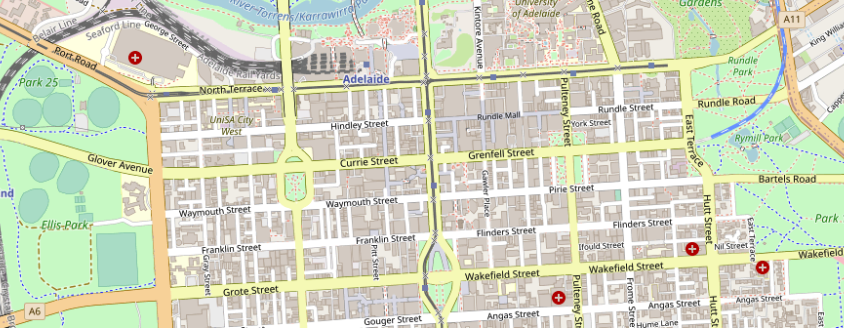
The resulting TIFF at zoom level 15 of just the city centre and neighbouring suburbs was 20 megabytes. The idea was add the other zoom levels to the TIFF but I never got around to doing that.
The resulting TIFF at zoom level 17 was 250 megabytes. The sizes are essentially the same as the sum of the individual PNGs.
Closing remarks
The situation has improved in the Mapnik project as it has been working proj6 support including in python-mapnik. The Mapnik project is nearly its 4.0.0 so hopefully that sees the related projects stablise on that new release as well as distributions getting new packages.